| Bitmo Labs GAMEBABY Price: $39.99 Find it on: Bitmo Labs 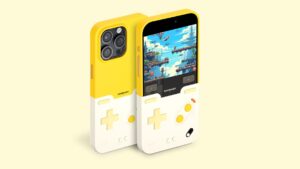 |
Rating: 3/10
Pros: Cons: |
Bitmo Lab’s GAMEBABY is the perfect example of a great concept that struggled in its execution.
Up until the GAMEBABY, Bluetooth controllers dominated the smartphone market if you wanted to use your phone as a retro game player. Controllers like the Backbone or the 8BitDo Lite could connect to your phone and provide excellent tactile touch controls, but the issue became carrying around a second clunky device that would need to be placed in a backpack as opposed to the convenience of your pocket. The GAMEBABY cuts through this by making a controller that acts as a protective phone case. When you’re ready to play a game, just split the case in half, flip the controller portion to the front screen, and the passive conductive design will physically make contact with the phone, providing that tactile touch that isn’t otherwise possible with a touch screen. By removing the battery and the bluetooth connection, the GAMEBABY suddenly becomes the most portable and practical way to have a tactile touch experience on a smartphone when mapped to the Delta emulator with an easily installable custom skin. At least, that’s how it’s supposed to work in concept.
The delivery is another issue. There are several glaring problems with the GAMEBABY, and the first one I’ll start with is its incompatibility with most screen protecters. The majority of screen protectors use some sort of tempered glass, and this proves to be too thick for the GAMEBABY’s controllers to make properly register with the phone’s touchscreen. I tried this with the GAMEBABY, and it had disastrous results, registering every third control input. You’ll need to either have no screen protector or hydro-gel to get the controller to function properly, though once you do, the controller is fairly responsive. The second issue is the controls themselves. The A/B buttons are too far apart, as is the four directions on the D-pad. The gap between A/B makes it impossible to do a proper Super Mario Bros. run with executing the turbo and jump buttons. Similarly, the D-pad struggles with multi-directional inputs. If you have a slower game like Mario Golf: Advance Tour on the Gameboy Advance, it works fine, but any sort of action game will be incredibly difficult to play on the GAMEBABY.
And while I did like the premium matte feel of the GAMEBABY, there are three more major issues I had with the hardware itself. As I mentioned earlier, the GAMEBABY needs to be split in half, and then flipped around for retro gaming. The experiencing of splitting it in half is difficult, and results in a large amount of accidental screen shots from the hard plastic accidentally triggering side buttons. I used this as my primary phone case for my iPhone 16 Pro Max for two days, and I registered at least three screenshots each time I wanted to use it as a game controller. This comes as a result of the plastic clasps being a bit too rigid, which also will lead to the eventual snapping of the clasps. I was provided a review unit from Bitmo Lab, and though I didn’t use the case long enough for this to be a problem, other reviewers said the clasp snapped after only a few weeks of use. While I didn’t use the GAMEBABY long enough to experience this issue, after the second day of usage, I was putting my phone in my pocket and the A button caught on the lip of my pants pocket, completely ripping out the button. It’s also worth mentioning that with the way the case splits in half and the positioning of the buttons, there’s no way this is MagSafe compatible, which made it difficult for me to charge. At the end of the day, this is just not a case you can use as your full-time case. My ultimate use for this case is just keeping the controller portion of the case in my glove box for whenever I’ve got extra time and I want to use my Delta emulator with tactile controls.
The second generation case, if Bitmo decides to make one, should focus on making the buttons more playable, a manual release for the clasps, and perhaps rubber buttons that aren’t as susceptible to snagging on clothing. Otherwise, while I certainly appreciate the effort, the game case as intended is a huge flop.